Fire TV Power Control from Home Assistant!
- Matt Zaske
- December 15, 2025
- 6 minutes
Our primary home TV setup comprises a Fire TV Cube, connected to an AVR unit, and fed to a non-smart TV. HDMI-CEC control set up years ago on the Fire TV Cube magically powers on/off the AVR and TV when the Cube is powered on/off. This configuration has been working for several years, even through hardware upgrades.
As it's a Fire TV Cube, Alexa is baked into the unit and that ecosystem generally works well for automation of the equipment in question (and a high Home Approval Factor here). But it's never really integrated with Home Assistant which wasn't a problem until I obtained a Voice Preview unit. I'd love to "locally" control the TV equipment directly from Home Assistant, and possibly with voice control, so integrating it all was suddenly more useful. At least in concept.
Stumbling Blocks
I wasn't going to tear everything apart just for the sake of making Home Assistant work (see note about high Home Approval Factor in its original configuration), so I needed another viable option.
HDMI-CEC
I knew it was all connected and controlled via HDMI-CEC, but the "brain" of the CEC part originates from the Fire TV Cube. My network-connected AVR has been connected to Home Assistant for some time, but in-built CEC controls for Home Assistant assumed I'd be connecting to something like the AVR, not through the Fire TV. So my attempts to use HDMI-CEC natively didn't work since the AVR wasn't the "brain" of that operation. Bummer.
Android Debug Bridge (ADB)
Now this seemed promising! ADB basically does what I am looking for, especially replicating the remote control functionality!
ADB requires some setup, and I chose to go the ADB server route since it could just run as an add-on in Home Assistant. It wasn't super complicated to install/configure the ADB Server add-on, but I was having difficulty getting connected to the Fire TV Cube at first. Among other things HA wouldn't persist connections to the Cube and I was having issues having the Cube remember/persist the developer mode connection (which you must approve and "remember" from the Fire TV side). Ultimately, this sorted itself out with some combination of HA reboots and adding the Cube's static IP address to the auto_connect_devices list. This kept the ADB service happy.

With that in place, the ADB integration would load properly and also be happy, without having to re-approve the ADB connection on the Fire TV!

Focusing On The Remote
I created a test automation sequence to play with remote commands. I could use the in-built options to do things with the remote.send_command action or the input keyevent {keycode} command as is illustrated in the ADB Remote section of documentation for Home Assistant. Navigating around, volume, home, etc. all worked well. But power...nothing worked.
This is where I gave up for a few months. Things were also super busy this summer/fall so I didn't write anything for the blog either. I'd try things here and there with variations of the keyevent codes or similar as I had a random couple hours or an evening, but nothing would work for managing the power button! Bummer.
HA-Firemote!
One evening or weekend I stumbled across HA-Firemote, a HACS integration which seemed like the KEY to all of this mess. Installation and configuration was quick and smooth.
But while all the other buttons worked with the Firemote (and is cool looking on a dashboard), the damn power button functionality just didn't work. Bummer.
Time To Capture The Remote Commands
I'd Googled this in fits and starts, discovering a couple of ways to capture the low-level commands being sent when using a remote. THIS seemed most promising since I knew whatever the physical remote was sending worked, but the physical remote was sending something different than the default keycodes.
I ran out of time to fiddle, so the idea was shelved. Until this past weekend...
Direct Capture in ADB Shell
I ended up doing most of my work directly from the ADB shell using the getevent listener. When you use this in the terminal/shell, it will display in real-time the commands coming from button presses, etc. Depending on how you're connected/interacting, the data comes back with in Hex in some/all fields (the output was similar, but different on two machines I used to connect), so there is much to interpret or convert to decimal for submitting via sendevent. But I now had the remote's unique event identifier and the sequence of commands being relayed when I pressed the power button on the remote!
This screenshot shows the output from connection to a successful single press of a Home button:
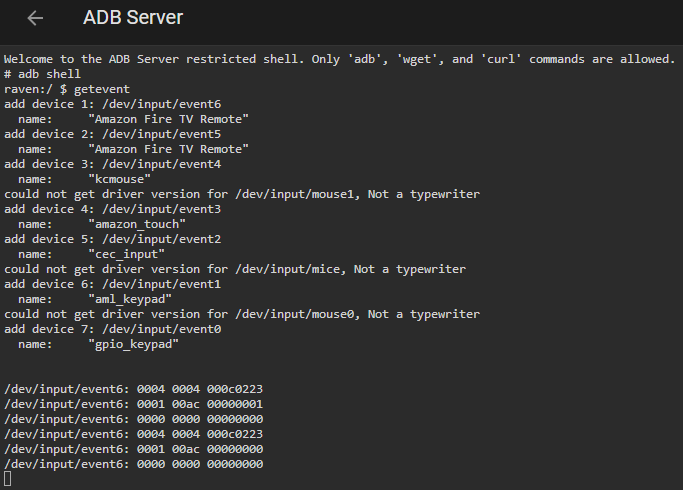
I'm deliberately skipping over much of the ADB shell business because after converting these commands to decimal and giving them a try, sometimes they worked...and sometimes they didn't. I still don't really know why other than batching or timing, but that's what led me to...
Enter learn_sendevent
Right in the ADB documentation in the actions section there's a bit describing the learn_sendevent action. I know I skimmed this originally but as it turns out it's been there all along! I created a separate automation that invoked the ADB: Learn sendevent action, manually triggered/ran the automation actions, and then pressed the power button!

Immediately in HA notifications I had the output I'd been seeking all along (and, to a large degree, what I had actually captured and mostly-successfully converted from my time in ADB shell)! These commands are actually chained together as "one" shell command with &&, which makes total sense and was likely the cause of my previous attempts failing as I was invoking them individually.
I added an action for Android Debug Bridge: ADB command in an automation and pasted in the relevant portion from the sendevent listener notification. And gave it a try.

The whole setup would immediately power up or down!!
Postmortem Reflection
Having gone through all of this, I can see exactly where in the documentation I just skipped over what I needed to use (the learn_sendevent business). I was assuming that since everything else was working, combined with all of the little moving parts, learning about and discovering new things, etc., that I didn't need to use that little subset for one bit of functionality. I went down a very different set of rabbit holes that I could've avoided had it been more obvious I should've started debugging with learn_sendevent for my hardware.
I still don't have a solid idea of why the default power button business doesn't work (other than a combination of things in how Amazon implemented Android TV), but I don't care either. Now I have the ability to "locally" control my TV equipment from Home Assistant, and that is the door I wanted to open for future automations! Good luck!
Upcoming Speaker Events
I am speaking at MMS Midway Edition, October 25-28, 2026!

Recent Posts
Past Speaking Engagements
I was a speaker at MMSMOA, May 3-7, 2026!

I was a speaker at MMS Music City Edition, October 12-15, 2025!

I was a speaker at TCSMUG Autopilot/OSD Day, July 15, 2025!

I was a speaker at MMSMOA, May 4-8, 2025!
I was a speaker at BrainStorm K20 Wisconsin Dells, March 9-11, 2025!

I was a speaker at MMS Flamingo Edition, October 20-23, 2024!

I was a speaker at TCSMUG OSD Day, July 31, 2024!
I was a speaker at NWSCUG, July 19, 2024!

I was a speaker at MMSMOA, May 5-9, 2024!
I was a speaker at BrainStorm K20 Wisconsin Dells, March 10-12, 2024!
I was a speaker at MMS Miami Beach, October 29-November 1, 2023